At the Desk · process
Will a Clamp Fan Fit Your Desk? Check More Than the Edge Thickness
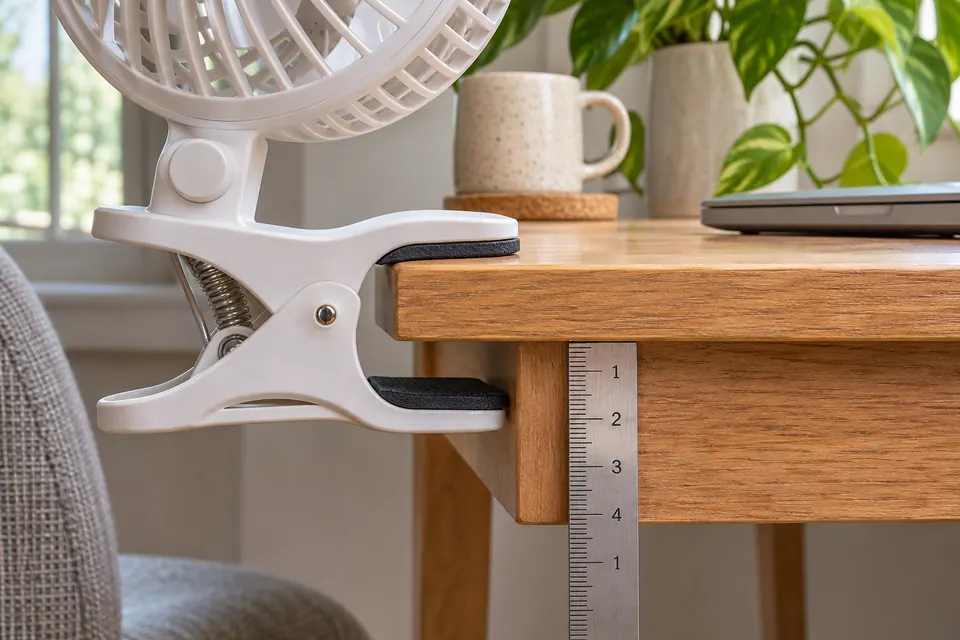
Check desk thickness, flat contact surfaces, underside clearance and the fan’s movement before buying a clamp fan. A clamp that opens far enough may still be unsuitable for a rounded edge, a delicate finish or a desk with an apron directly below the top.
This checklist covers fans designed with their own clip or clamp. It does not establish that an ordinary desk fan can be attached to a monitor arm. If you share the workspace, first complete the separate office permission and placement check.
Measure the place where both jaws will sit
Choose the intended mounting spot, then inspect it from above and below. Measure the thickness at that spot, including any raised lip or additional layer that the clamp would enclose. A specification for the broad desktop does not necessarily describe its edge.
Record how far a flat surface continues inward from the edge on both faces. Look for a metal frame, drawer, cable tray or apron underneath. These can stop a jaw from reaching its intended contact position even when the top is thin enough.
| Desk check | Decision it supports |
|---|---|
| Thickness at the mounting point | Reject a fan whose stated clamp limit is smaller |
| Flat contact area above and below | Check whether both jaws can sit as instructed |
| Underside obstruction and edge shape | Identify a fit question that thickness alone cannot answer |
| Surface material and finish restrictions | Avoid assuming padding makes every surface suitable |
| Space around the installed fan | Allow normal head adjustment, controls and power access |
If a manufacturer does not publish jaw reach or the required contact area, leave those fields unknown. Send the desk measurements and a clear edge photograph to the manufacturer, or inspect the actual clamp before purchasing.
Two 1.5-inch limits do not describe the same installation
The U.S. RYOBI PCF02B product page, checked on November 8, 2026, lists a clamp for material up to 1½ inches thick. The PCF02 operator’s manual provides additional installation instructions: clean the mounting surface and pads, and check that the fan is secure before and during use.
The current Vornado PIVOT CLIP has the same listed 1.5-inch opening, but its Use and Care guide specifically calls for a solid, horizontal surface. It describes a lower adjustment knob and warns that delicate surfaces can be permanently marked.
Those published limits help eliminate an obviously oversized desk edge. They do not show that either fan fits your desk or that the two clamps are interchangeable. We have not tested either installation here. Use the instructions for the exact model you receive.
Check clearance with the fan in its working position
Account for the whole fan, not just its base. Check the space needed to point the head toward your seat without contacting a monitor, wall, shelf or paperwork. Confirm that you can reach the controls and the clamp adjustment without moving unrelated equipment into the fan’s path.
For a battery model, include room to remove the battery as instructed. For a corded model, plan the cord route before installation. Vornado instructs users to route the cord through the rear clip and avoid positions where the unit can be tripped over, pulled, bumped or knocked down. A cable caught by a moving chair can undermine an otherwise convenient location.
Keep the fan off while planning and follow its instructions for disconnecting power or removing the battery before adjustment. RYOBI’s manual specifically requires battery removal for assembly, adjustment and cleaning. Secure the base before adjusting the head as directed.
Choose a different mounting spot when the fit is unresolved
Do not force a clamp beyond its limit or improvise packing pieces to compensate for a curved or obstructed surface. A different approved location, a different purpose-built clamp or a tabletop fan may be the more practical choice.
Your completed check should identify the exact fan, the measured mounting spot, any unresolved dimension and the applicable furniture restriction. Once installed according to its manual, check stability as instructed; a successful initial fit does not replace those ongoing checks.
Questions and answers
Is a desk thinner than the maximum clamp opening automatically suitable?
No. Thickness is only one check. The clamp also needs the contact surface specified by the manufacturer, room beneath the edge and clearance for normal operation. A bevel, apron or delicate finish can prevent a suitable installation.
Do padded jaws mean a clamp fan cannot mark a desk?
No. Vornado's PIVOT CLIP instructions warn against clipping onto delicate surfaces where permanent marks may occur. Follow the exact fan and furniture instructions even when the clamp has pads.
Can I attach any desk fan to a monitor arm?
This guide covers purpose-built clip or clamp fans only. It does not establish compatibility between a separate fan, adapter and monitor arm. Ask the manufacturers about an intended mounting system rather than assuming the fittings or loads are suitable.