At the Desk · process
Replacing a Fan Remote: Match the Model and Part Number
Before ordering a replacement fan remote, match the exact machine to a complete part number on the manufacturer’s regional support site. A listing that names another fan, or a remote that looks familiar, leaves compatibility unresolved.
One reader who had lost an AM09 remote asked whether remotes advertised for AM07 or AM08 would work instead. That question calls for a documented part match, rather than a search for the closest-looking accessory. Original replacement-remote question
Make a machine-and-part record
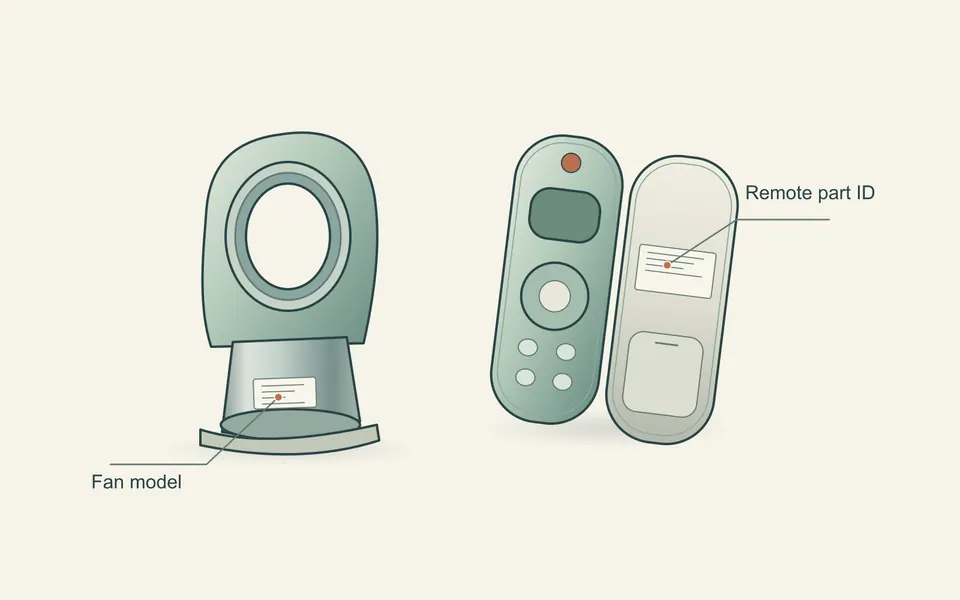
Use the model label, purchase records or existing manual to identify the fan. Record the country where it was supplied. If the old remote is available, photograph its identifying text; if it is lost, leave its part number unknown.
| Field | What to record | What leaves a gap |
|---|---|---|
| Machine | Brand, full model and any suffix | A product-family name or room photograph alone |
| Market | Country of sale and the regional support page | A search result from an unspecified country |
| Remote | Complete replacement part number, including its suffix | Only a color, shape or marketplace title |
| Compatibility | The exact machines listed for that part | A list naming a neighboring model |
| Required controls | Functions you need to retain, checked against your manual | Assuming a shared power button proves every command works |
| Confirmation | Manufacturer page or reply identifying the combination | A statement about another machine or regional version |
Dyson’s US support page provides a serial-number lookup and a separate machine-identification route for someone without the serial number. Use the manufacturer’s private support channel if identification needs that information. You do not need to post a full serial number in a public question. Dyson machine support
Compare the actual compatibility entries
The following are documentation examples checked on November 10, 2026. They are not a universal Dyson compatibility chart or a recommendation to import a remote. No price or stock promise is included.
| Regional source | Complete part number | Models explicitly shown in that source |
|---|---|---|
| Dyson Australia, replacement remote for Heater Fan | 966538-01 | AM09 Hot+Cool fan heater |
| Dyson Australia, replacement remote for Cool Fan, black | 965824-03 | AM06, AM07 and AM08 |
| Dyson US, remote-control part page | 966538-04 | AM09 fan heater and Hot+Cool Jet Focus AM09, Black/Nickel |
Read the current entries for Australian part 966538-01, Australian part 965824-03 and US part 966538-04.
For the original AM09 question, the Australian AM07/AM08 entry does not establish a supported AM09 replacement. The AM09-specific entry supplies a relevant lead to verify against the reader’s own machine and market. This is a documentation finding; we have not tested whether an unlisted combination produces any response.
Keep every digit and the suffix when copying a part number. Do not shorten two numbers to a shared prefix or assume that a color selection authorizes every machine in the same product family.
Treat conflicting or incomplete pages as an open question
Even official pages may leave a match unclear. At this check, the US AM07 support page links remote 965824-02, while that remote’s US detail page displays AM06 and AM08 in its compatibility section. Save both links and ask Dyson to resolve the exact AM07 variant. The difference is not evidence of a fault or proof that the part is incompatible. AM07 support page, 965824-02 detail page
Use the same rule when a marketplace listing names many models without a manufacturer reference. Ask for the complete part identifier and the documentation supporting your particular machine. A seller’s “universal” description still needs a verifiable match.
Choose the next step according to the evidence:
- Exact machine and region are documented: keep the source with the proposed part number, and read the applicable operating instructions.
- Only a neighboring model is listed: obtain confirmation before ordering it as a substitute.
- Support and part pages disagree: send both links with the machine identity and ask which entry applies.
- The machine itself is uncertain: resolve identification before selecting the remote.
Ask for confirmation of the combination
“My fan is [full model and country of sale]. I need a replacement for [lost remote or known old part number]. Your page [link] lists [proposed complete part number], but [specific missing or conflicting detail]. Please confirm the part for this machine and the instructions that apply to it. I need [the controls relevant to me].”
Keep the answer with your machine record. A response about another model leaves the question open. After identification is settled, follow the confirmed instructions for normal operation; do not try generic pairing codes, receiver changes or wiring modifications from unrelated models.
If you are assessing a used fan as a whole, use the secondhand model and recall checklist separately. If the problem is that a ceiling fan’s existing remote has no reverse button, the direction-control checklist addresses that different task. Matching a replacement remote does not resolve either question by itself.
Sources checked November 10, 2026. This guide compares published part information; it does not report hands-on compatibility tests or diagnose a failed remote or receiver.
Questions and answers
Can I replace an AM09 remote with one advertised for AM07 or AM08?
Do not assume that listing covers AM09. The official Australian examples checked here list part 966538-01 for AM09 and part 965824-03 for AM06, AM07 and AM08. Match your actual machine and regional support information before choosing a replacement.
Does the remote's shape or magnetic storage prove compatibility?
No. Treat appearance as an identification clue, then check the complete part number and the machines named by the manufacturer. A similar case or storage feature does not establish the supported commands.
What if the model appears on a support page but is missing from the part's compatibility list?
Keep both page links and ask the manufacturer to confirm the part for your exact machine and market. Do not silently combine different regional lists or treat a missing entry as proof that the remote cannot work.
Can this checklist tell me how to pair an unspecified replacement remote?
No. First establish the supported fan-and-remote combination, then use that combination's instructions. This guide does not supply universal pairing sequences or diagnose a receiver fault.